> ## Documentation Index
> Fetch the complete documentation index at: https://academy.uagenius.ai/llms.txt
> Use this file to discover all available pages before exploring further.
# Platform Overview
> How UAGenius is structured and how teams use it end to end.
This page explains how the console is organised and defines the vocabulary used on every other page. Read it once and the rest of the Academy will make sense.
## Games are the unit of everything
A **Game** is a workspace for a single title. The selector in the top-left corner of [Home](/home) switches between the games you have access to.
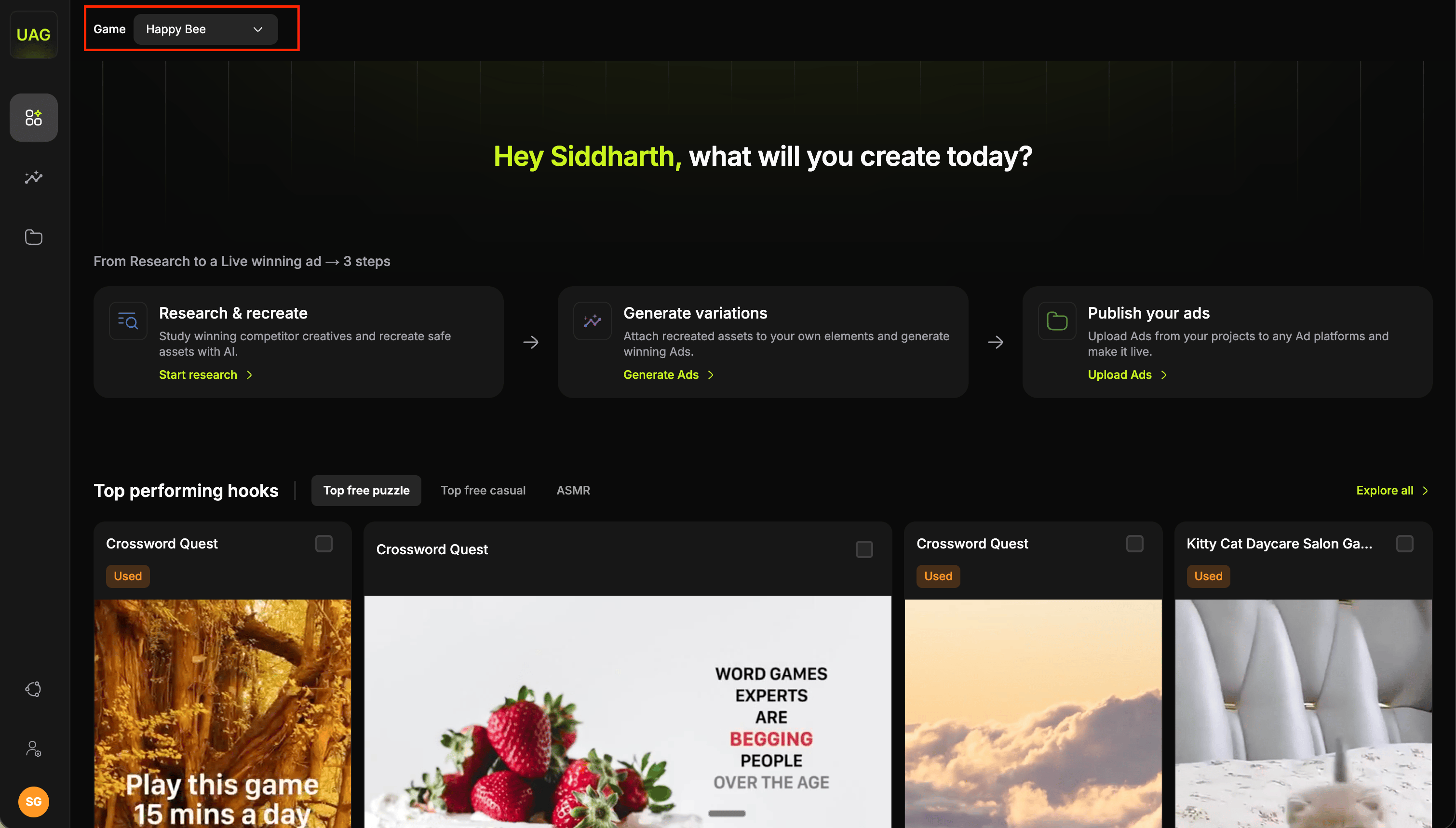 Switching games swaps almost the entire console:
* the competitor ad library and its filters
* the projects, its folders and its custom properties
* the Video Studio project list
* the brand assets the AI uses as visual references
Ad account connections and user accounts are shared across games. Everything else is scoped to the game you are in.
Check the game selector before you generate or publish. Assets are created in whichever game is active, so confirming it first keeps your library tidy.
## Asset taxonomy
Six asset types appear throughout the console: in research tabs, in the asset pickers, and as the columns of Video Studio.
| Type | What it is |
| ------------- | -------------------------------------------------- |
| **Hook** | The opening seconds of the ad. The attention grab. |
| **Hook text** | The text overlay burned onto the hook. |
| **Body** | The main gameplay footage. |
| **Body text** | The text overlay burned onto the body. |
| **Audio** | The soundtrack. |
| **End card** | The closing with the CTA. |
End cards are the one asset type you bring yourself. Upload your own into a board under [Saved assets](/saved-assets), then add them as a column in [Video Studio](/video-studio).
## The three surfaces
A library of ad assets taken from live competitor ads: hooks, gameplay bodies, texts and audio, each filterable by network, region, platform, aspect ratio, concept and date. Bookmark what you like, then turn winning hooks into your own footage with **Recreate with AI**.
See [Competitor research](/competitor-research), [Saved assets](/saved-assets), [Recreate a hook](/recreate-hook), [Request a body template](/request-body-template) and [Recreate a body](/recreate-body).
A tool that combines different assets into multiple variations. Pick several hooks, hook texts, bodies, body texts and audio tracks, and the studio renders every combination as a separate video.
See [Video Studio](/video-studio).
Upload finished variations to Meta or Google Ads. Meta uses saved templates that carry your ad account, page, copy and campaign settings. Google uses a campaign and ad group tree.
See [Publish to Meta](/publish-meta) and [Publish to Google](/publish-google).
Supporting these are [Projects](/projects), a Google Drive-like space for every file of your game, [integrations](/integrations) for your ad accounts, and [workspace administration](/workspace-administration) for managing team, brand assets and custom properties for your files.
## The most important mechanic
Hooks and bodies work differently, and knowing this up front shapes how you plan a test cycle.
A competitor hook offers **Recreate with AI** immediately. You get a generated hook in minutes.
A competitor body offers **Request template**. The UAG team turns that gameplay into a template, which is then yours to recreate and compose with.
Bodies are gameplay footage, so they are not generated directly from a competitor’s video. You can still compose with a competitor body or your own uploaded gameplay exactly as it is, and nothing stops you doing that today.
A template is what you request when you want to recreate the gameplay itself, either to make AI variations of your own gameplay or to turn a competitor's into a copyright free version of your own. Since template creation takes time, send requests early in your cycle and continue working on hooks while they are being prepared. Once the template is available, you can recreate it with AI and make changes in real time.
[Request a body template](/request-body-template) covers the request flow in full, and [Recreate a body](/recreate-body) covers what to do once one arrives.
## Where your output goes
Where something lands depends on what produced it.
**Video Studio variations** save to [Projects](/projects) as permanent, searchable, taggable files. They also stay in that project's results view for immediate review and upload.
**Recreated hooks** stay with the competitor hook they were built from. Find them in [Competitor research](/competitor-research) under **Asset Status → Recreated Hooks**, and pick them from the **Hook** column in [Video Studio](/video-studio).
## Typical flow
Filter the competitor library to what is running now, sort by active days or impressions, and bookmark the winners to a board.
You can compose with competitor bodies or your own uploads without waiting for anything. Request a template when you want AI variations of your own gameplay, or a copyright free version of a competitor's. Requests have a turnaround, so send them here and carry on.
Rebuild the bookmarked hooks with your brand characters as references, one at a time or in bulk, in a single click. Do this while the template requests are in flight.
Once the UAG team delivers a template, it is yours to work with in the platform. Recreate it with AI to produce more versions of that gameplay, and keep adjusting until it fits the test you have in mind.
Combine your recreated hooks, your text variants and your body variants in Video Studio, and let it render every combination.
Select the batch, then apply a Meta template or pick your Google ad groups, and upload.
Star the winners so your next cycle starts from creative that has already proved itself.
Switching games swaps almost the entire console:
* the competitor ad library and its filters
* the projects, its folders and its custom properties
* the Video Studio project list
* the brand assets the AI uses as visual references
Ad account connections and user accounts are shared across games. Everything else is scoped to the game you are in.
Check the game selector before you generate or publish. Assets are created in whichever game is active, so confirming it first keeps your library tidy.
## Asset taxonomy
Six asset types appear throughout the console: in research tabs, in the asset pickers, and as the columns of Video Studio.
| Type | What it is |
| ------------- | -------------------------------------------------- |
| **Hook** | The opening seconds of the ad. The attention grab. |
| **Hook text** | The text overlay burned onto the hook. |
| **Body** | The main gameplay footage. |
| **Body text** | The text overlay burned onto the body. |
| **Audio** | The soundtrack. |
| **End card** | The closing with the CTA. |
End cards are the one asset type you bring yourself. Upload your own into a board under [Saved assets](/saved-assets), then add them as a column in [Video Studio](/video-studio).
## The three surfaces
A library of ad assets taken from live competitor ads: hooks, gameplay bodies, texts and audio, each filterable by network, region, platform, aspect ratio, concept and date. Bookmark what you like, then turn winning hooks into your own footage with **Recreate with AI**.
See [Competitor research](/competitor-research), [Saved assets](/saved-assets), [Recreate a hook](/recreate-hook), [Request a body template](/request-body-template) and [Recreate a body](/recreate-body).
A tool that combines different assets into multiple variations. Pick several hooks, hook texts, bodies, body texts and audio tracks, and the studio renders every combination as a separate video.
See [Video Studio](/video-studio).
Upload finished variations to Meta or Google Ads. Meta uses saved templates that carry your ad account, page, copy and campaign settings. Google uses a campaign and ad group tree.
See [Publish to Meta](/publish-meta) and [Publish to Google](/publish-google).
Supporting these are [Projects](/projects), a Google Drive-like space for every file of your game, [integrations](/integrations) for your ad accounts, and [workspace administration](/workspace-administration) for managing team, brand assets and custom properties for your files.
## The most important mechanic
Hooks and bodies work differently, and knowing this up front shapes how you plan a test cycle.
A competitor hook offers **Recreate with AI** immediately. You get a generated hook in minutes.
A competitor body offers **Request template**. The UAG team turns that gameplay into a template, which is then yours to recreate and compose with.
Bodies are gameplay footage, so they are not generated directly from a competitor’s video. You can still compose with a competitor body or your own uploaded gameplay exactly as it is, and nothing stops you doing that today.
A template is what you request when you want to recreate the gameplay itself, either to make AI variations of your own gameplay or to turn a competitor's into a copyright free version of your own. Since template creation takes time, send requests early in your cycle and continue working on hooks while they are being prepared. Once the template is available, you can recreate it with AI and make changes in real time.
[Request a body template](/request-body-template) covers the request flow in full, and [Recreate a body](/recreate-body) covers what to do once one arrives.
## Where your output goes
Where something lands depends on what produced it.
**Video Studio variations** save to [Projects](/projects) as permanent, searchable, taggable files. They also stay in that project's results view for immediate review and upload.
**Recreated hooks** stay with the competitor hook they were built from. Find them in [Competitor research](/competitor-research) under **Asset Status → Recreated Hooks**, and pick them from the **Hook** column in [Video Studio](/video-studio).
## Typical flow
Filter the competitor library to what is running now, sort by active days or impressions, and bookmark the winners to a board.
You can compose with competitor bodies or your own uploads without waiting for anything. Request a template when you want AI variations of your own gameplay, or a copyright free version of a competitor's. Requests have a turnaround, so send them here and carry on.
Rebuild the bookmarked hooks with your brand characters as references, one at a time or in bulk, in a single click. Do this while the template requests are in flight.
Once the UAG team delivers a template, it is yours to work with in the platform. Recreate it with AI to produce more versions of that gameplay, and keep adjusting until it fits the test you have in mind.
Combine your recreated hooks, your text variants and your body variants in Video Studio, and let it render every combination.
Select the batch, then apply a Meta template or pick your Google ad groups, and upload.
Star the winners so your next cycle starts from creative that has already proved itself.